

Exploring how budgeting could feel less like a chore
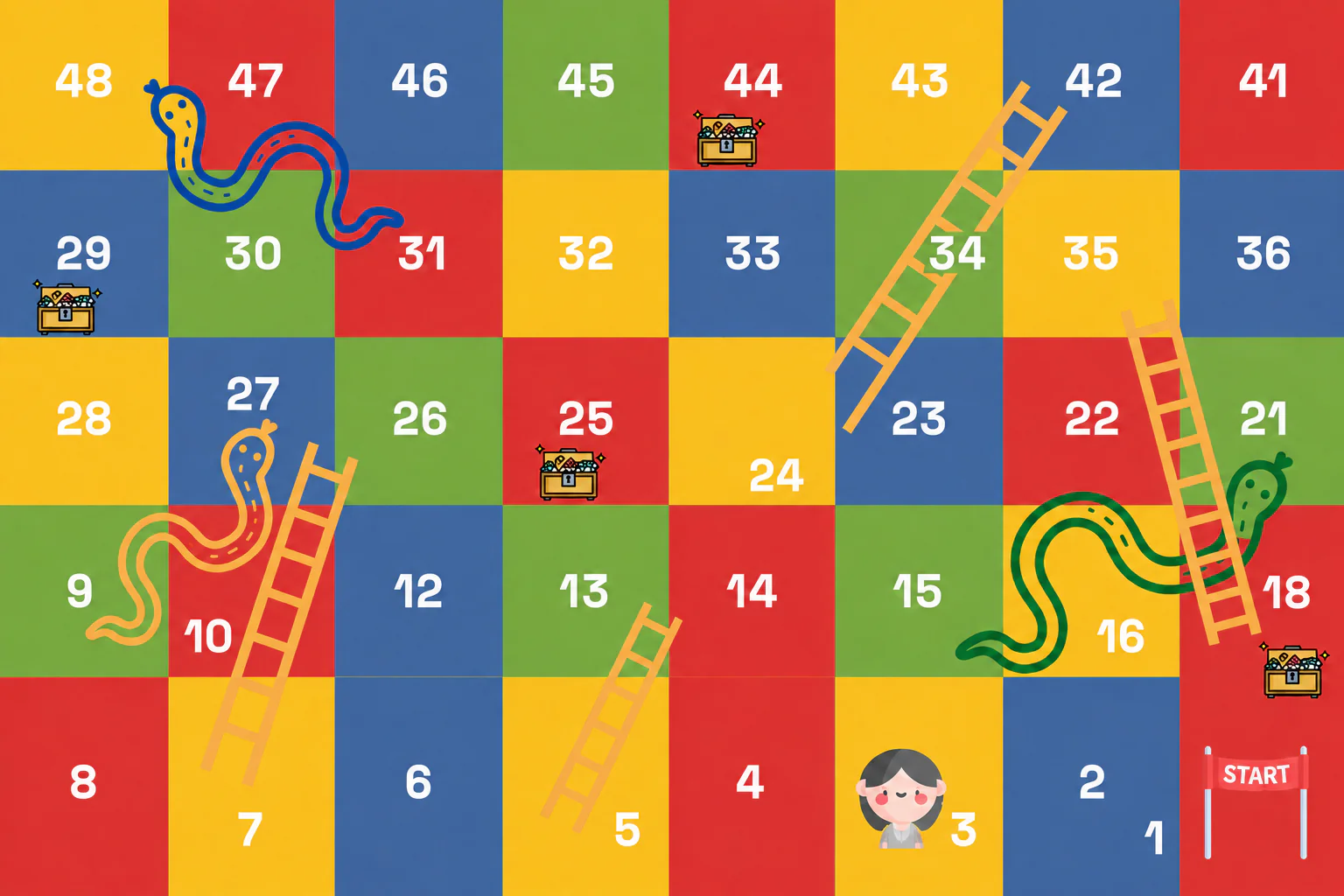
Slithers is a mobile budgeting concept for young adults who understand the value of managing their money but struggle to maintain the habit. It combines lightweight expense tracking and goal planning with a snakes-and-ladders-inspired reward loop designed to make progress feel more immediate.
I took Slithers from research to a tested high-fidelity concept on my own, as my capstone for Vertical Institute’s UX Design Bootcamp in 2022. Rather than using gamification as decoration, I explored whether everyday budgeting actions, financial progress and a simple reward system could form one connected experience.
Project type
Independent UX bootcamp capstone
Timeline
June 2022
Deliverables
Research synthesis, personas, user flows, wireframes, and a tested high-fidelity mobile prototype.
Tools
Figma, Miro
Scope of work
- UX research
- User flows
- Information architecture
- Prototyping
- Visual foundations & reusable components
The challenge
Budgeting matters, but maintaining it feels burdensome
Young adults may understand that budgeting matters without sustaining the daily effort it takes: recording expenses feels repetitive, confronting spending can be uncomfortable, and the benefit feels too distant to justify the work.
The opportunity wasn’t simply another expense tracker—I wanted the core task to require less effort while making progress visible enough to give people a reason to return.
How might we reduce the effort and emotional friction of budgeting while making progress feel more immediate for young adults?
What the research revealed
I interviewed five people aged 20–28 over Zoom: two students and three working adults, all of whom had tried a budgeting app. Because my questions touched on reminders, rewards and playful interactions, I treated positive reactions to gamification as directional interest rather than behavioural evidence, and the small convenience sample as exploratory.
Across five interviews, four recurring themes shaped the direction of the concept.
Expense tracking required too much effort
Four of five participants had tried spreadsheets but found them tedious on mobile, and disliked apps that took too many steps to record a transaction.
Motivation faded even when the value was understood
Participants recognised budgeting’s importance, yet some stopped once initial motivation passed—the delayed benefit struggled to compete with the immediate effort of logging expenses.
Financial visibility could trigger avoidance
For some, tracking meant confronting spending they’d rather not acknowledge—the experience needed to inform without feeling punitive.
Progress needed to be understandable quickly
Participants valued expense overviews, visible goals, tips and reminders—a quick sense of where money was going and whether they were on track, without reading a dense dashboard.
RESEARCH-INFORMED PERSONAS
Turning recurring behaviours into audience profiles
I grouped the shared needs and behaviours from the interviews into two research-informed profiles.
PERSONA 01

Chloe Lim
"I want to stay on top of my spending, but updating Excel every day feels like a chore."
Profile
22 · University student · Singapore
Motivation
Save for her graduation trip and build financial independence
Frustration
Forgets to record expenses · finds Excel and existing budgeting apps tedious
PERSONA 02

Derrick Chan
"I need one place to track everyday spending, loans and bills while saving for what comes next."
Profile
26 · Working adult · Singapore
Motivation
Pay down his loans and credit-card bills while saving to move out
Frustration
Too many transactions to track · difficulty remembering balances and payments
RESEARCH FINDINGS → OPPORTUNITY AREAS → FIRST PROTOTYPE SCOPE → EARLY INTERFACE EXPLORATION
From evidence to scope
Reframing the problem, prioritising what the first prototype needed to test, and exploring how to bring it to life — each stage below is shown with the artefact that supports it.
Reframing the problem
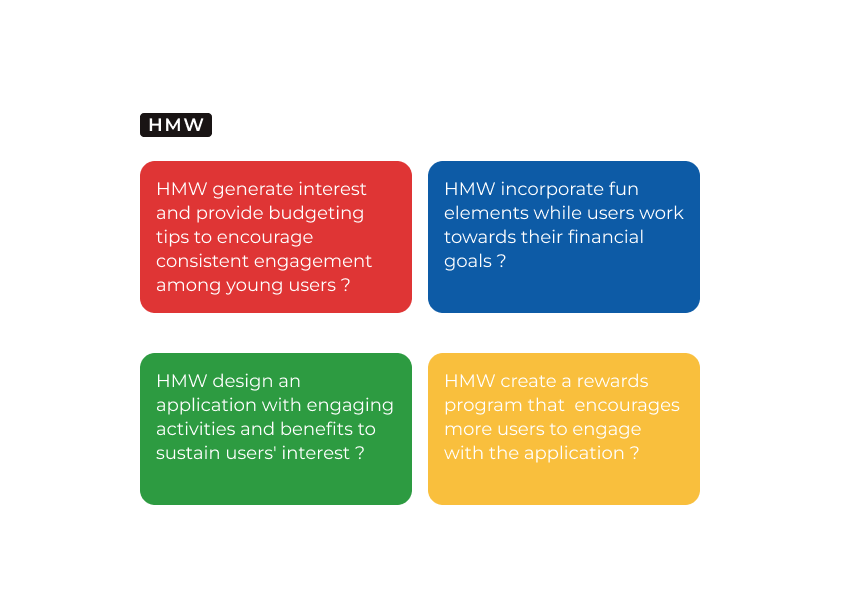
The interviews shifted my question from "How can I build a better expense tracker?" to "How can progress feel immediate enough to justify repeated effort?" I wrote four how-might-we prompts to open up directions such as guidance, play and rewards. They were prompts rather than requirements, so I judged the ideas they produced against four principles drawn from the interview findings.
How-might-we prompts
Four principles for evaluating ideas
Each principle later shaped a design decision: lightweight entry became decision 01, visible feedback became the home-screen progress hub (02), the routine principle became the daily roll (03), and encouragement shaped both the reward loop and the visual tone (03 and 04).
From principles to user stories
I wrote user stories from the same findings. These became the items I prioritised next:
Prioritising the first prototype’s scope
Included in the first prototype
Because the research generated more ideas than the capstone timeline allowed, I used MoSCoW prioritisation to scope the first prototype: expense entry, spending visibility, goals, game progress, tips and rewards.
Deferred
A wallet, social system and expanded multiplayer board were deferred—they added complexity without directly helping test the central experience.
First prototype scope
Exploring the concept with Crazy 8s
I used Crazy 8s to explore ways of making progress visible and introducing an immediate return interaction. Snakes-and-ladders offered a familiar, step-based structure connecting budgeting actions to gradual progress, tips and rewards—selected as a concept to test, not a research-proven solution to habit formation.
Early interface sketches
Connecting budgeting actions to a return loop
The key decision was to connect budgeting and play: financial actions would drive game progress, while the game would return users to their financial information. This remained a product hypothesis requiring longer-term behavioural testing.
Set goals
Create or monitor category- and time-based savings goals and understand the remaining amount.
Track spending
Add expenses and review spending across day, week, and month views.
Earn progress
Budgeting activity and goal milestones contribute to progress and bonus opportunities.
Roll and move
Use the daily or earned roll to move through the game board.
Reveal guidance or rewards
Discover financial tips, and review available, upcoming and redeemed rewards.
Return to budgeting
Bring the user back to their spending and goals, completing the loop.
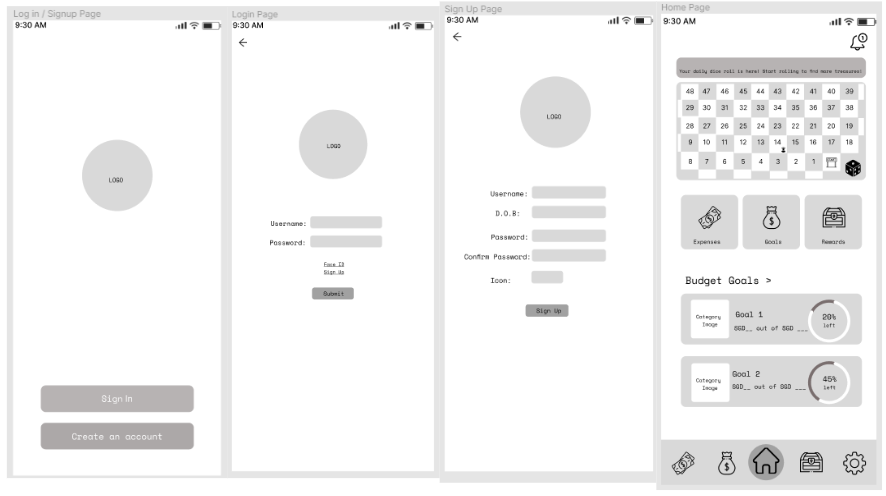
Translating the loop into a mid-fidelity prototype
I translated the loop into a mid-fidelity prototype, settling navigation, hierarchy and task completion before applying the visual system.
Four key design decisions
01
Keeping expense tracking lightweight
- Participants repeatedly described tracking as tedious, so expense entry became the workflow to simplify first.
- The flow records only the essential transaction details; mapping it exposed where repeated entry ran long, so I cut intermediate steps.
RATIONALE
Recording a purchase on the go, then seeing recent expenses and the spending chart on the same screen, keeps tracking quick enough for everyday life.
02
Making the home screen a progress hub
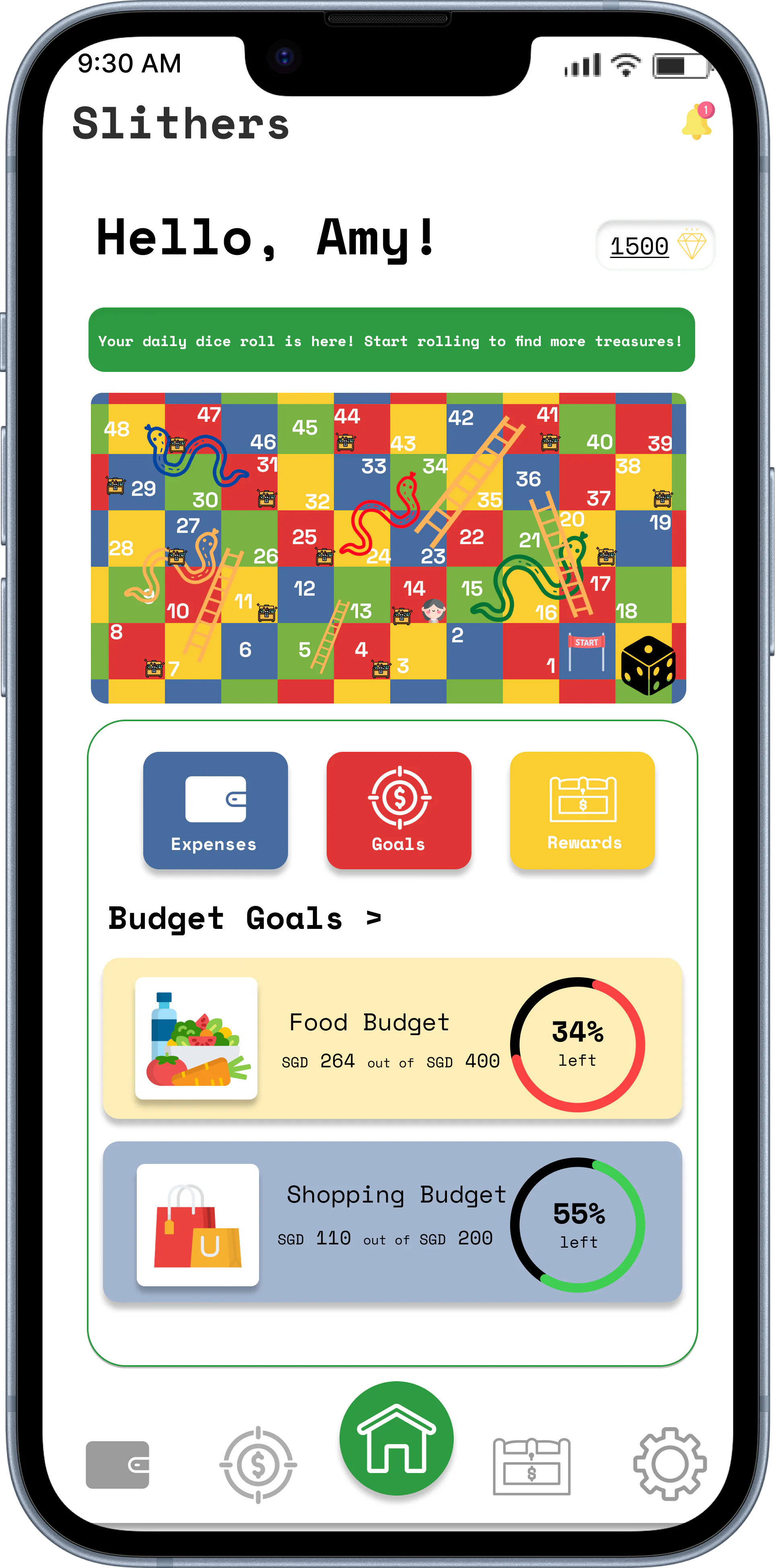
- The home screen brings goal progress, core budgeting tasks and one daily game action into one view, so users can see where they stand and decide what to do next.
- Less frequently needed detail stays in the dedicated expenses, goals and rewards views to avoid overloading it.
RATIONALE
Financial progress remained the reason for using the product, while the game provided a lightweight return interaction.
03
Encouraging consistent use through daily rewards
- Users receive one roll each day they return, and each roll can unlock something useful, such as a budgeting tip or voucher.
- Continued visits and progress towards goals unlock bonus rolls and better rewards, tying the incentive back to tracking.
RATIONALE
Daily rolls give an immediate reason to come back, while tips and rewards encourage building tracking into a routine.
04
Balancing playfulness with financial clarity
- A white base, bright accents and Space Mono created an approachable alternative to the formal tone of many financial products.
- Colours had consistent roles, and financial information stayed separate from decorative game elements, so legible numbers and clear controls came first.

Visual foundations and reusable components
A lightweight system balancing financial clarity with playful progress, rebuilt from the 2022 design-system board so it stays legible here.
Colour roles
Typography
Space Mono — Bold
Your monthly budget
Space Mono — Bold
$1,240 remaining
Space Mono — Regular
Monthly progress
Space Mono — Regular
You have used 34% of your budget
Instrument Sans — Regular
Budgeting gives you control over your money so you can spend intentionally, save more, and stay prepared for life’s surprises.
Navigation & tabs
Actions & inputs
Financial & reward components
Balance remaining
$1,240
of $2,000 budget
Groceries
12th May 2022
Vacation Fund
$750 of $2,000

Roll the dice
Earn a reward!

Treasure Found!
You earned 50 points
RATIONALE
The capstone did not include a full accessibility or financial-compliance review; contrast, chart labelling, error prevention and privacy messaging would need evaluation before development.
Testing findings and next iteration
Evaluating usability—not long-term behaviour.
I ran remote usability sessions with the same five interview participants, who completed tasks across expenses, spending, goals and the game-and-reward model in the high-fidelity prototype. Reusing them fit the timeline but introduced familiarity bias, and the sessions assessed comprehension and task usability, not whether Slithers could sustain budgeting over time.
Testing revealed four actionable gaps and informed four proposed improvements for a subsequent iteration.
Reward earning was unclear
Observed
Participants understood that rewards existed, but some were unsure how their budgeting activity affected game progress.
Design response
Proposed contextual explanations showing which actions earned progress and how they connected to rolls and rewards.
Expense management felt incomplete
Observed
Participants looked for a way to remove an incorrectly added expense.
Design response
Proposed a delete action to individual entries with a confirmation step to reduce accidental removal.
Spending views needed more flexibility
Observed
Participants wanted to compare spending across different periods rather than remain limited to a monthly chart.
Design response
Proposed day, week and month controls while retaining month as the default view.
Goal information needed to be more visible
Observed
Participants wanted more context on the home screen without opening each individual goal.
Design response
Proposed adding descriptions to the goal cards.
These are recommended next steps: they were not implemented or retested within the project timeline.
Final experience
Final experience
Bringing the complete experience together
The walkthrough shows the loop end to end: managing a goal, recording an expense, playing the daily roll and discovering a reward. Supporting account screens were included only to make the prototype navigable.
Outcome and evidence
Outcome
Slithers resulted in an end-to-end high-fidelity mobile prototype informed by five exploratory interviews and evaluated through five remote usability sessions.
5
Exploratory interviews
5
Remote usability sessions
1
Connected high-fidelity prototype
What the project demonstrates
Research to direction
Translated qualitative patterns into a focused product hypothesis.
Focused scope
Prioritised one connected experience within a limited capstone timeline.
Connected workflows
Designed related expense, goal, game and reward workflows as one coherent experience.
Usability evidence
Used usability findings to identify missing controls and unclear mental models.
As a capstone prototype, Slithers was not launched. The outcome therefore reflects prototype completion and usability evidence rather than post-launch product metrics.
Learnings & reflection
What I learned
Turning research into design decisions
I learned to carry participant needs into the product flow, using research to decide what to prioritise and how the experience should work.
Framing the problem before designing
Taking time to define the problem before designing screens gave the project clearer direction—grounded in real user habits and challenges rather than assumptions.
Learning directly from users
Testing with real users showed me that a flow can feel clear to the designer but work differently in practice. Their feedback surfaced gaps and assumptions I couldn’t have caught alone.
Why this project still matters
Slithers was my first complete, evidence-led design project, and the one that showed me how research, scope, prototyping and testing build on one another.
Where it led
 TAU Intelligence